NEWYou can now listen to Fox News articles!
The email looks polished. It uses official logos, formal language and a serious warning about your account. That’s exactly what makes it so dangerous. It’s the kind of message many of us would open without a second thought, especially when it mentions security and a government agency. Candace T did pause. She took a closer look and trusted her gut before clicking anything. She wrote to us with three important words:
“Looks very fishy!”
She’s right. This email tries hard to look like it came from the Social Security Administration, complete with official branding and a serious tone. But once you slow down, the warning signs start to show. Let’s break it down so you know exactly what to watch for.
Sign up for my FREE CyberGuy Report
- Get my best tech tips, urgent security alerts and exclusive deals delivered straight to your inbox.
- For simple, real-world ways to spot scams early and stay protected, visit CyberGuy.com – trusted by millions who watch CyberGuy on TV daily.
Plus, you’ll get instant access to my Ultimate Scam Survival Guide free when you join.
SSA IMPERSONATION SCAMS ARE GETTING MORE PERSONAL
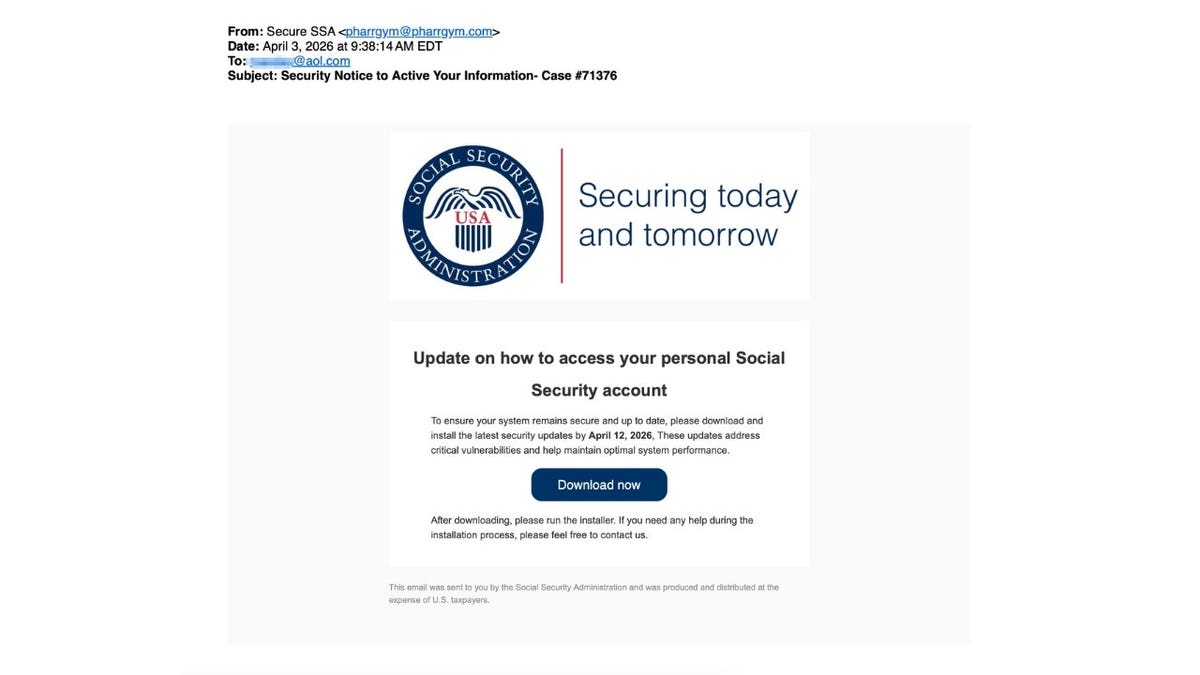
A polished email claiming to be from the Social Security Administration urges recipients to download a statement, but federal officials have warned this exact tactic is a scam. (Kurt “CyberGuy” Knutsson)
What this Social Security email scam claims
The message says there is a “Security Notice to Active Your Information” tied to a case number. It urges you to download a security update by a specific date to keep your account safe. There’s a big “Download now” button front and center. That’s the hook. This is a classic phishing setup designed to get you to click before you think.
Red flags in this Social Security email scam
Here are the warning signs that show this email is not what it claims to be.
The sender’s email is not from the government
The email comes from a random address that has nothing to do with the Social Security Administration. Official emails from government agencies come from .gov domains. This one does not.
The wording feels off
The subject line says “Security Notice to Active Your Information.” It should say “activate,” not “active.” Small errors like this are often a giveaway that something is not right and can signal a scam email.
The message creates urgency
The email warns, “You are required to download your updated statement by April 14, 2026.” It pushes you to act quickly with a firm deadline. Scammers rely on that pressure, so you do not take the time to verify. Real government notices rarely demand immediate action through email.
It tells you to download something
The email urges you to click a “Download Now” button to get your “updated statement.” This is a huge warning sign. The message is trying to get you to download and install a file which could contain malware that gives attackers access to your device or personal data.
It uses branding to look official
The Social Security logo and layout are designed to build trust. Scammers copy these elements to make emails look legitimate. The message even includes a line that says, “This email was sent to you by the Social Security Administration and was produced and distributed at the expense of U.S. taxpayers.” That kind of official-sounding language is meant to reassure you, but it does not mean the email is real.
It contradicts official SSA policy
The Social Security Administration has made this clear: They do not ask for sensitive information or send software downloads through email. That alone tells you this message is not legitimate.
SOCIAL SECURITY ADMINISTRATION PHISHING SCAM TARGETS RETIREES
Fake Social Security emails use official branding and urgency to trick you into clicking before you think. (Kurt “CyberGuy” Knutsson)
What could happen if you click the link
If you click the “Download now” button, a few things could happen:
- Malware could install silently on your device
- Your login credentials could be captured
- You could be redirected to a fake website that steals your information.
In many cases, you won’t even realize it happened until later.
Why Social Security email scams keep working
These emails work because they mix fear with familiarity. People trust names like Social Security. They worry about their accounts. That combination makes it easier to trick someone into clicking. The design looks polished. The message feels urgent. The goal is simple: get you to act before you think.
How to protect yourself from Social Security email scams
These simple steps can help you avoid falling for this type of phishing email.
1) Pause before you act
If an email asks you to download something or act fast, stop and take a breath. Urgency is one of the biggest scam tactics.
2) Check the sender’s address carefully
Look closely at the email domain. Government agencies use .gov addresses. Anything else is a red flag.
3) Verify the message independently
If the email claims to be from a government agency, contact that agency through its official website or phone number to confirm.
4) Avoid clicking links or downloading files
Do not click links or download attachments from unexpected emails. Instead, go directly to the official website by typing the address yourself.
BE AWARE OF EXTORTION SCAM EMAILS CLAIMING YOUR DATA IS STOLEN
Social Security scammers are leaning on fear and urgency, sending polished emails that look official but route victims to fraudulent sites. (Lisa Forster/picture alliance)
5) Use strong antivirus software
Install strong antivirus software and keep it updated. It can help block malicious downloads and warn you before you open something dangerous. Get my picks for the best 2026 antivirus protection winners for your Windows, Mac, Android & iOS devices at Cyberguy.com.
6) Protect your personal data online
Consider using a data removal service to reduce how much of your personal information is exposed online. Less data available means less for scammers to exploit. Check out my top picks for data removal services and get a free scan to find out if your personal information is already out on the web by visiting Cyberguy.com.
7) Keep your devices updated
Make sure your phone and computer have the latest updates. Security patches fix vulnerabilities that scammers often target.
8) Turn on account alerts and monitoring
Enable alerts for important accounts so you can spot unusual activity quickly if something goes wrong.
9) Report suspicious emails
Forward scam emails to the Social Security Administration’s Office of Inspector General at oig.ssa.gov/report or report them through the SSA fraud hotline. You can also mark the message as spam in your inbox. Reporting scams helps protect others and can assist investigators in stopping these attacks.
Kurt’s key takeaways
Candace trusted her instincts and flagged this email right away. That quick pause likely saved her from a bigger problem. Scammers are getting better at making messages look real. But the red flags are still there if you know where to look.
CLICK HERE TO DOWNLOAD THE FOX NEWS APP
If a message looks real and feels urgent, would you pause or click first? Let us know by writing to us at CyberGuy.com.
Sign up for my FREE CyberGuy Report
- Get my best tech tips, urgent security alerts and exclusive deals delivered straight to your inbox.
- For simple, real-world ways to spot scams early and stay protected, visit CyberGuy.com – trusted by millions who watch CyberGuy on TV daily.
- Plus, you’ll get instant access to my Ultimate Scam Survival Guide free when you join.
Copyright 2026 CyberGuy.com. All rights reserved.